

The following best practices apply to implementing your site's logical structure, which includes your site's software change management lifecycle and software inventory classification scheme.
All environment names and stage names should be the same length and the names should be unique.
Business Value:
When names are the same length, it is easier to use a name as part of a data set name. Unique names avoid confusion when referencing a particular stage.
Each system name should identify the purpose of the application. Each subsystem name should identify the specific application within the system.
Business Value:
Names that are easy to identify help avoid confusion.
Additional Considerations:
If you are performing concurrent development, you can use subsystems in the development environment to manage the concurrent development.
More information:
For more information about using subsystems for concurrent development, see Use Sandboxes for Concurrent Development.
Type names should be normalized; that is, type names should correspond to the language, but not the version, of the source code (COBOL, JCL, CLIST, and so on). For example, there should be one type for COBOL, not separate types for COBOL/LE and COBOL II. Processor groups can be used to distinguish between language versions, such as COBOL LE and COBOL 2. We recommend the following Type names:
Business Value:
Normalized type names make it much easier to upgrade the code from one version of the language to another.
Use private work areas (sandboxes) for concurrent development.
Business Value:
Sandboxes provide separate work areas for different development activities. This lets developers work on the same code simultaneously, without interfering with each other's work, thereby improving the efficiency of the development staff. Typically, several sandboxes are set up so that developers can work on the same code independently; and then, the changes made in the sandboxes are combined in an integration subsystem, where the changes can be accepted or rejected.
Additional Considerations:
Methods of sandbox development include: 1) subsystem sandboxes; 2) environment sandboxes; and 3) private work area stages. Subsystem sandboxes are easiest to setup; however, if subsystems are required to subdivide systems (applications), it is necessary to set up environment sandboxes using the environment sandboxes method or the private work area stages method.
Details regarding sandbox development methods follow:
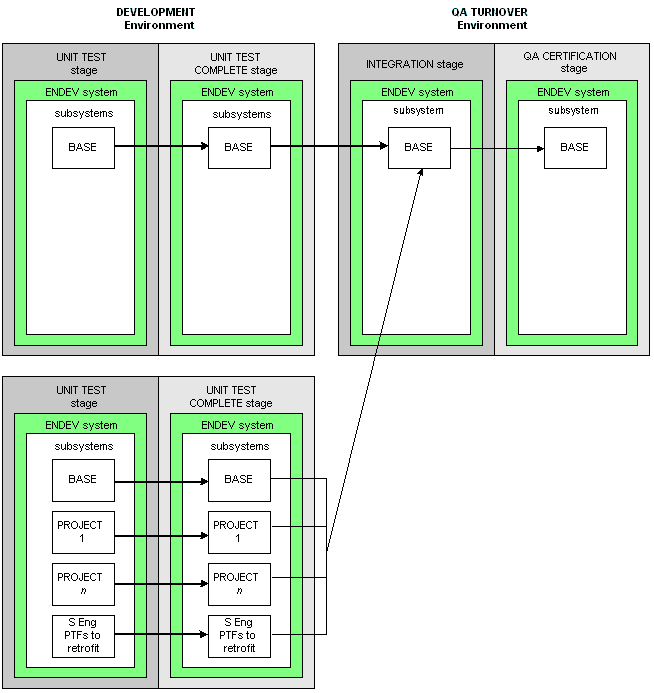
For example, the following diagram shows development of a code branch where coding changes for projects 1 through n are performed in subsystem sandboxes. Also, the maintenance team has their own subsystem sandbox. Then all development changes are integrated in the Integration stage.
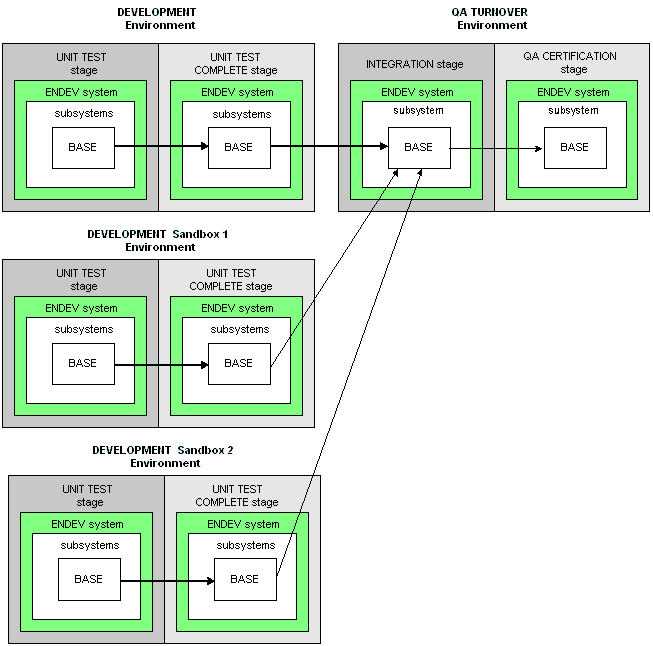
For example, this diagram shows development activities can be performed in the Development Sandbox 1 environment and the Development Sandbox 2 environment. Then the changes can be integrated in the Integration stage.
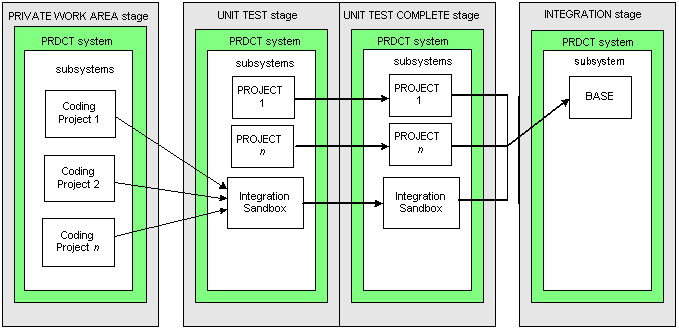
For example, the following diagram shows a stage named Private Work Area that contains multiple subsystem sandboxes for development activity. The development changes are integrated in a subsystem in the Unit Test stage.
If you need to maintain multiple releases of the same application concurrently, use different systems (or subsystems, if available) to segregate the different versions of the code. Make sure that the system (or subsystem) name is incorporated into the related data set names to create unique libraries.
Some sites require maintaining multiple releases of the same program or element concurrently. For example, this requirement can occur when the site is a software vendor that needs to support program A shipped in release 1, release 2, and release 3, because not all of their clients have implemented the latest release.
Business Value:
The subsystem definition provides the flexibility most sites are looking for in this situation. Using the application name as the system definition and the release number as the subsystem definition has the following advantages:
|
Copyright © 2014 CA.
All rights reserved.
|
|